BG678 Game Deposit, BG678 Game Withdrawal and withdrawal-problem records
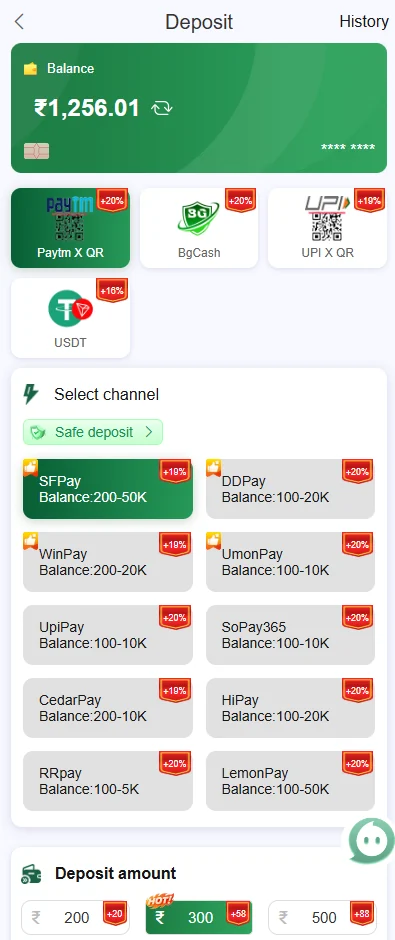
The current interface shows Paytm X QR, BgCash, UPI X QR and USDT, followed by several payment-channel names and visible amount ranges. Choose a method that matches the account you control and the amount you intend to send.
A highlighted channel is not automatically the right one. Returning users who cannot reach the wallet should first restore access through BG678 Game login.
For the broader BG678 Game overview and the other account sections, return to the BG678 Game Login and wallet overview after finishing this BG678 Game deposit withdrawal topic.
Amount ranges, QR and UPI matching
A route can enforce its printed minimum and maximum. Entering an amount outside that interval may prevent the order from being created. Some QR channels also require the exact amount generated by the live screen.
Verify the payee and keep the bank or wallet reference after payment. Avoid transferring money to a personal number received through an unrelated chat. Check Deposit History before sending another amount when the balance has not updated.
USDT network and address accuracy
The supplied screens include USDT for deposit and USDT TRC20 for withdrawal. Confirm the network shown by BG678 Game and verify the first and last characters of the address before approving a token transfer.
A transaction sent through the wrong network or to an incorrect address may not reach the expected wallet. Never copy a destination from an unrelated message.
Available balance, frozen funds and activity amounts
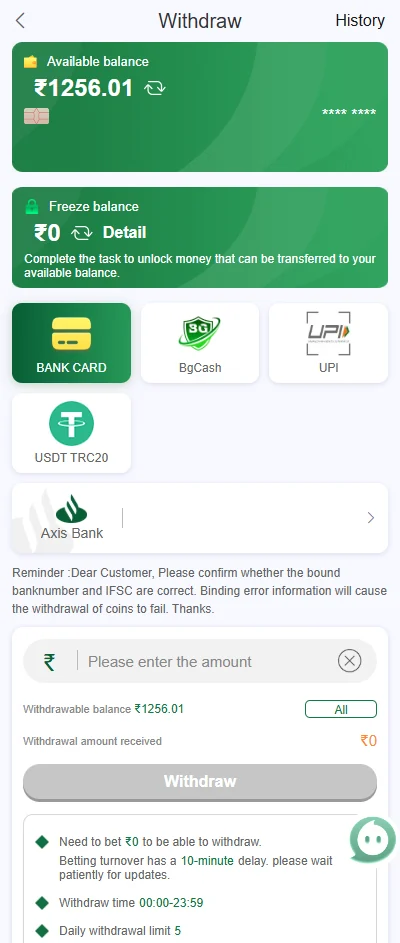
The withdrawal interface separates available and frozen balances. A total visible elsewhere can include funds that are not currently eligible for withdrawal.
Frozen or promotional amounts can depend on a pending transaction, activity condition or another account rule. Compare the Activity and wallet screens instead of treating a banner headline as withdrawable cash.
Beneficiary details and withdrawal methods
Bank Card, BgCash, UPI and USDT TRC20 appear as withdrawal choices. Review the account name, bank number, IFSC, UPI identifier or token address after saving the beneficiary.
An unexpected beneficiary change is a security issue. Secure the account and recovery channel before requesting a withdrawal; do not assume the platform will detect an incorrect destination automatically.
Disabled, pending, failed and completed requests
A missing beneficiary, current minimum, frozen balance or another account condition can keep the control unavailable. Read the visible message and Withdrawal History before submitting again.
A request may move through pending, failed or completed states. Compare a completed record with the receiving bank, UPI service or token wallet, and confirm whether a failed amount returned before creating a new request.
Match transaction evidence without exposing private data
Compare amount, time, channel and reference between the payment service and BG678 Game history. A bank confirmation only proves that the payment service processed its side; it does not by itself show that the platform matched the account order.
Save the useful reference, but hide full bank numbers, wallet addresses, QR codes and phone details before sharing an image. Passwords and OTPs are never transaction evidence.
Pause when payment information is uncertain
Do not create another deposit, change the beneficiary or repeat a withdrawal merely because the first status has not updated quickly. Multiple requests make the account history harder to understand.
If the instructions, payee or balance changes unexpectedly, pause wallet activity and use the BG678 Game problem page. After a confirmed deposit, review the game categories and keep play within a planned limit.
Match every wallet order with one complete record
Before paying, note the account, amount, selected channel and order or reference information shown on the platform. After payment, retain the bank, UPI or wallet confirmation without exposing private credentials. For BG678 Game, note whether the order used Paytm X QR, BgCash, UPI X QR, USDT or another selectable route.
The payment proof and the platform order should refer to the same amount and time. A screenshot from another transaction does not establish that the current account order was completed. Match the BG678 Game order amount and time with the external confirmation instead of relying on a cropped payment image.
Do not send a second payment merely because the balance has not refreshed. First check the order record, refresh the account once and wait for the status to update. Do not repeat a BG678 Game QR, UPI, BgCash or USDT payment until the original order has a clear final state.
Read pending, failed and completed as different states
Pending means the request has not reached a final state. Failed indicates that the platform or payment route did not complete the order. Completed should be checked against both the platform record and the external payment account. BG678 Game pending, failed and completed labels should be compared with available balance, frozen balance and the external payment account.
A frozen balance, turnover requirement, beneficiary check or minimum amount can affect withdrawal availability. Read the exact on-screen message before changing payment details.
When a status changes unexpectedly, preserve the earlier and later screens with dates and personal details hidden. This creates a clearer timeline for support.
Protect beneficiary and payment details
Enter beneficiary information directly inside the verified account route. Avoid sending full bank details, UPI PINs, OTPs or private wallet keys through chat messages.
Check the account holder name, number, UPI ID or network address before submission. Small differences can send a withdrawal to the wrong destination or cause rejection. Before a BG678 Game withdrawal, verify the bank card, BgCash, UPI or USDT TRC20 beneficiary details and network.
If an unfamiliar beneficiary is already saved, stop the transaction and secure the account before editing or adding another method.
Check QR expiry and payment-order timing
A QR or UPI order can be time-limited. Confirm that the order is still active and that the amount matches before approving payment.
Do not reuse an old QR image from a previous order unless the live BG678 Game screen explicitly shows it for the current transaction.
If the order expires after payment, keep both the platform order and external confirmation for review.
Confirm USDT network and address before sending
A wallet address can belong to a specific network such as TRC20. A correct-looking address on the wrong network can still cause loss.
Compare the full address, network, amount and any fee before approval. Never share a private key or recovery phrase.
For withdrawal, verify the saved beneficiary again after any account or device change.
Build a timeline for a delayed wallet status
Record the order time, amount, channel and each status change. A timeline is more useful than a single cropped screenshot.
Check whether the external payment account shows completed, reversed or pending and compare it with the platform record.
Pause further transactions until the earlier order reaches a clear final state.
Review the final wallet record after resolution
When a delayed order reaches a final state, compare the platform status with the bank, UPI or wallet record and note any reversal or fee.
Keep only the evidence needed for personal tracking, with account and transaction details protected.
Do not assume that a resolved order establishes the processing time for every future transaction or method.
Check account security after an unexpected wallet event
An unfamiliar payment method, beneficiary or withdrawal request can indicate an account-security problem rather than a processing delay.
Change the password through the verified route and review active sessions before editing wallet details.
Do not continue transacting until the account owner can explain the visible changes.